Showing posts with label C. Show all posts

Sunday, 28 July 2019

Arrays in C | Array Programs in C

Arrays in C | Array Programs in C


Hello friends,Today we will discuss about Arrays in C language.

Arrays is a very popular and useful data structure used to store data elements in a contiguous memory location.It stores similar types of elements or values under one variable.Suppose if you declare integer type variable it stores only integer types of values.

syntax:

datatype variable-name [size of elements];

for example:

int num[5];
or
int num[5]={1,2,4,5,3};

Here,Five elements  are stored in array 'num'.Array elements are stored sequentially in separate locations.Arrays element has its own index number which is started by 0.It means we can access or initialize individual elements by its index number.Index number is also called as subscript number.

for example:

int num[5]={1,4,3,5,7};
num[0]=1;
num[1]=4;
num[2]=3;
num[3]=5;
num[4]=7;


Points to Remember 

  • All the elements of an array share the same name.
  • They are distinguished from one another with the help of the element number or index number.
  • The index number is used to access the value of individual element.
  • We can modify the value of any element by its index number without hurting another element.
  • If you want to delete,modify,replace any value ,you need not require changing all other elements.
  • Any element of an array can be assigned to another ordinary variable or any array variable.
               For example: int num1,num2[5];

                                      num2[5]={1,2,4,7,8};
                                      num1=num[3];
                                      num[3]=num[5];
  • When an array declared and not initialized,it contains garbage values.
  • The amount of memory required for an array depends upon the data type and the number of elements.


Array Programs in C


One-Dimensional Array and Operations


Array elements are stored contiguously in sequence one after the other. The elements of an array are just arranged in one – dimensional array to represent its elements.

We learned how to declare, initialise and access the array elements.

We will learn how to traverse, insert, delete and display elements in the array during program execution.


Traversing: The operation of displaying or listing all elements of an array is called traversing. The following program explains traversing with one-dimensional array.

Write a program to read and display the elements of an array.

Void main ()
{
clrscr ();
int num [5], j;
printf (“\n Enter five elements:”);
for (j=0; j<=5; j++)
scanf (“%d”, &num[j]);
printf (“\n Element Address”);
for (j=0; j<5; j++)
printf (“\n%d %u”, num[j], &num[j]);
getch ();
}

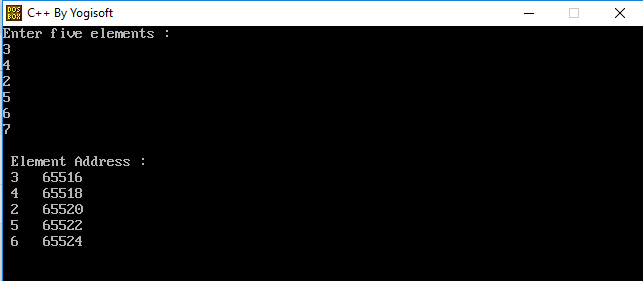
ScreenShot :
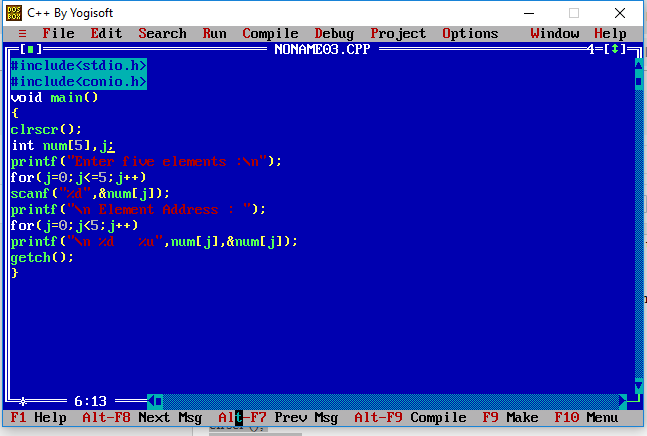
Display Array elements

Array element display program


Here, In the above program, an array num [] is declared. The first for loop with the help of scanf () statement reads the elements and places in the array. The element position is indicated by the loop variable j. Same procedure is applied for displaying elements. The printf () statement displays the elements and addresses on the screen.
In an array we can insert, delete or add any element but we cannot insert or delete the memory location. We can change only values.


Deletion: This operation involves deleting specified elements from an array and rearrange the elements.

Write a program to delete specified element from an array and rearrange the elements.

Void main ()
{
int num [20]={0};
int j,k,n,p,t;
printf(“\n Enter number of elements : ”);
scanf (“%d”,&n );
printf(“/n Enter elements : ”);
for(j=0;j<n;j++)
scanf(“%d”,&num[j]);
printf(“\n Elements are : ”);
for(j=0;j<n;j++)
printf (“\n %d   %u”, num[j],&num[j]);
printf (“\n Enter element number to delete:”);
scanf (“%d”, &p);
--p;
for (j=0; j<n; j++)
{
If(j>=p)
num[j]=num[j+1];
}
for (j=0; j<n; j++)
{
If(num[j]! =0)
printf (“\n %d %u”, num[j], &num[j]);
}
getch ();
}


Screenshot:
Delete array element program

Program to delete element in array

Demo to delete array element


Here, an array num [20] is declared. The program asks for the number of elements to be entered. User has to enter the following input.
Number of elements to be entered and integers.
Element number to be erased from an array.

The first loop and scanf () statement reads numbers from keyboard and places in the array. In the second for loop onward the position of an element number is to be erased, the next array element is replaced with the previous one. Thus, the specified element is removed from an array. The third for loop and printf () statement display the elements of an array. You can see in the output that the third memory location is the same only if its contents are changed.


Insertion : This operation is used to insert an element at a specified position in an array .

Write a program to insert an element at a specified position in an array.

Void main ()
{
int num [20]={0};
int j,k,n,p,t,s;
printf(“\n Enter number of elements : ”);
scanf (“%d”,&n );
printf(“/n Enter elements : ”);
for(j=0;j<n;j++)
scanf(“%d”,&num[j]);
printf(“\n Elements are : ”);
for(j=0;j<n;j++)
printf (“\n %d   %u”, num[j],&num[j]);
printf (“\n Enter element number to delete:”);
scanf (“%d %d”,&s, &p);
p--;
for (j=n; j>=p; j++)
{
num[j+1]=num[j];
Num[j]=s;
}
for (j=0; j<=n; j++)
{
printf (“\n %d %u”, num[j], &num[j]);
}
getch ();
}


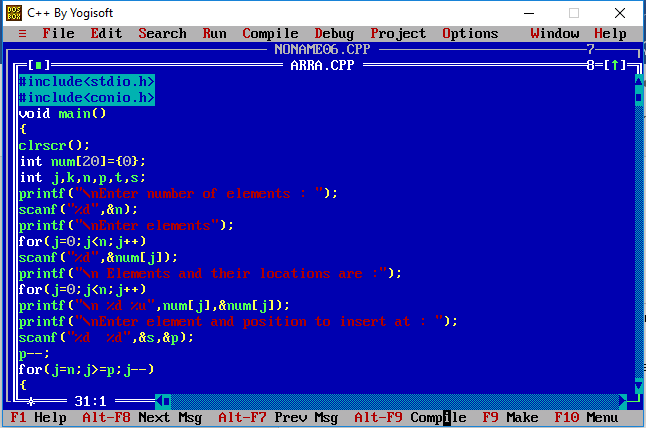
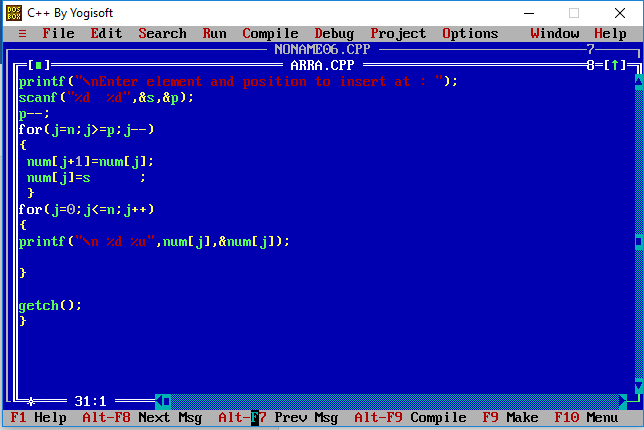
Screenshot:
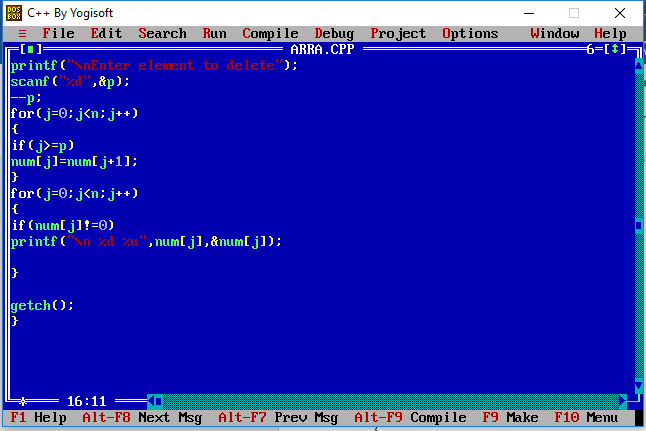
Program to insert array element

Program array insertion in C

Inserted element in array using C


Here, an element is inserted. The array elements are shifted to the next location and at a specified position and a space is created and inserted new element. Here , you can also see that though we inserted a new element, the memory location of the second element is the same.Once again it is proved that in array operation only contents of memory can change but the actual addresses remain as it is.The address of the first element is called the base address.This address can be stored in another pointer and array element can be accessed.


Array Search Element

Searching: An array element can be searched. This process of seeking specific elements in an array is called searching.

Write a program to search a specified element in an array

Void main ()
{
clrscr();
int n,i;
int x[10]={2,2,3,4,2,4,4,,6,8,7};
printf(“\n Array elements are : ”);
for(i=0;i<=9;i++)
{
printf(“%d”,x[i]);
}
printf(“\n Enter the element to search in an array : ”);
scanf(“%d”,&n);
for(i=0;i<10;i++)
{
if(x[i]==n)
flag=0;
break;
else
flag=1
}
if(flag==0)
printf(“Element found”);
else
printf(“Element not found”);
getch ();
}


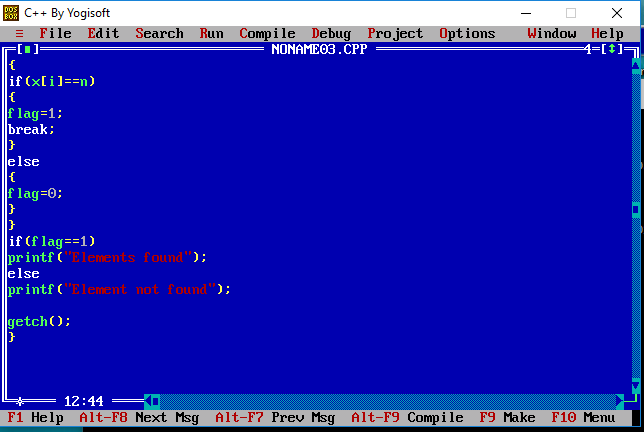
Screenshot :


Search array element in c

Program to search element in c

Search element in c


Here, an integer array is initialised with elements.The element which is to be searched is entered through  the user.using a for loop all the elements are read.The if statement checks every element with the array elements.When the if condition satisfies the message ‘element found’ message is displayed.Thus,the specified element can be searched . Message ‘element not found’ is displayed when an element is not searched.


Wednesday, 24 July 2019

Do-While Loop in C

do-while loop in C

do-while loop is place where the condition is to be tested.It will executes atleast one time even if the condition is false initially.In do-while,the condition is checked at the end of the loop.It executes until the condition becomes false.

Syntax:
do
{
//body of the loop.
}while(test-condition);


Lets take a simple program

A program to compute the factorial using do-while loop

Factorial program using do-while

Factorial Demo using do-while


A program to evaluate the series using do-while loop.


Series Program using do-while

Series Demo using do-while


Difference between while and do-while loop

While Loop
Do-While Loop
Condition is specified at the top
Condition is specified at the bottom
Body Statements are executed when the condition is satisfied
No brackets for a single statement
Brackets are essential
It is an entry-controlled loop
It is an exit-controlled loop


Monday, 22 July 2019

While Loop in C

While loop in C


While loop is used in programs for the repeated execution in a loop until a certain condition is satisfied the loop.

Syntax:

while(test-condition)
{
//body of the loop
}

Test-condition is indicated at the top and it takes the value of the expression before processing the body of the loop.The loop statements will be executed till the condition is true.When the condition becomes false the execution will be out of the loop.

lets take an example:

A program to print a string nine times on the output screen using while loop.

String program in c

String program using while loop in c


A program to add 10 consecutive numbers starting from 1.

Consecutive number program in C

Consecutive Number program using while loop


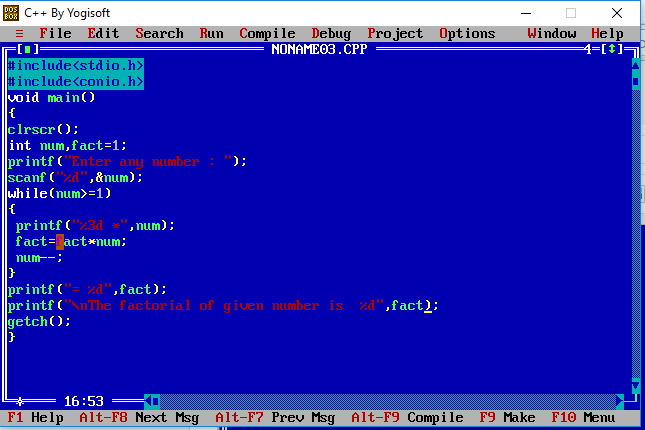
A program to print factorial of a given number using while loop.

Factorial using while loop

Factorial program using while loop


While loop Programs in C

Lets take some more examples of while loop in c

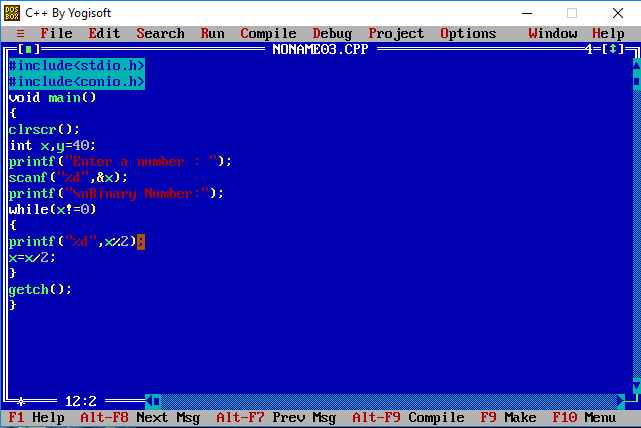
A program to convert decimal number in to binary number.


Convert number using while loop

Convert number program using while loop

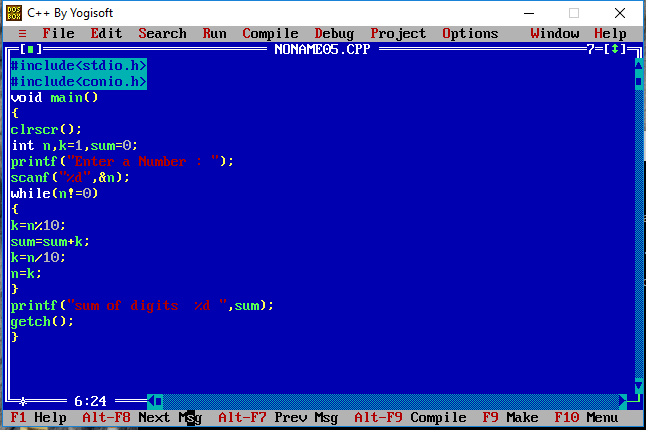
A program to input a number by user and sum of its digits.


Digit program using while loop

Program using while loop

A program to print the entered number in the reversed order.


Reverse number using while loop

Reverse number Program using while loop


For Loop Programs in C

For Loop Programs in C


Hello friends,

We are learning about loops , Today we will see or learn some more programs in for loop in C language.

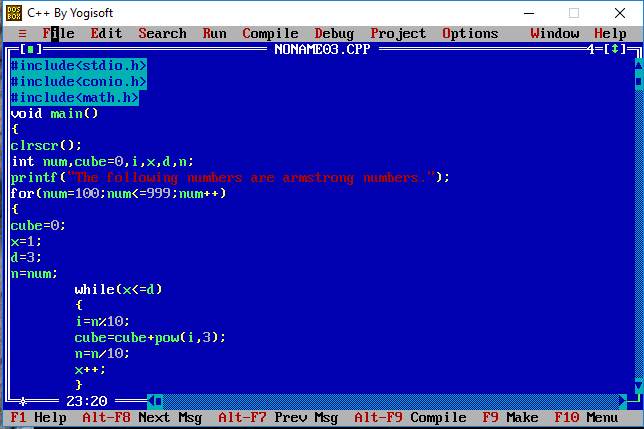
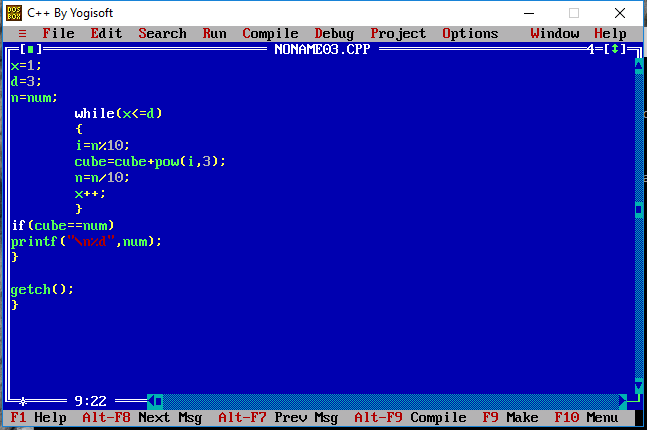
A program to detect the Armstrong Number in three digits from 100 to 999.


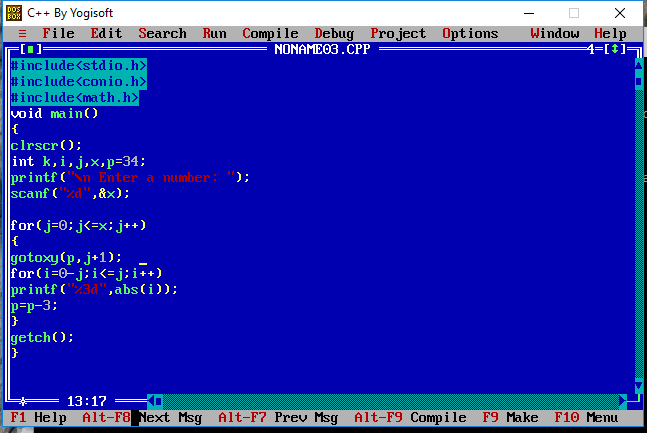
A program  to display the numerical pyramid structure using for loop .


Note: The gotoxy() function moves the cursor on the output screen wherever desired.It takes x co-ordinates and y co-ordinates.


A program to display patterns using for loop.


Sunday, 21 July 2019

Loops | For Loop in C

Loops in C


Hello friends
 Today we will discuss about loops in C programming Language.

Loops are repeatedly executed for a certain number of times.C Programming Language  supports three types of loop control statements for loop,while loop and do_while loop.

For loop allows to execute a set of instructions until a certain condition is satisfied.Conditions may be predefined.It comprises three actions or parameters.These three actions are initialisation, test_condition and Re-evaluation which are separated by semicolons.

Syntax :

for(initialisation,test_condition,re-evaluation)
{}

The initialization sets to an initial value.This statement is executed only once.
The test_condition is a relational expression that determines the number of iterations.
The re-evaluation decides how to make changes in the loop by increment or decrement operations.

We can write for loop in different ways:

1.Infinite loop

for(;;) 
 It goes infinite. It has no arguments/parameters.

for(a=0;a<=20;)
It also goes infinite because 'a' is neither incremented nor decremented.

2.Finite loop
for(a=0;a<=20;a++)
It display values from 0 to 20.

for(a=20;a>=0;a++)
It display values from 20 to 0.


A program to find square root.

How to define loop in c

C language loops


For loop in C


Lets take some examples

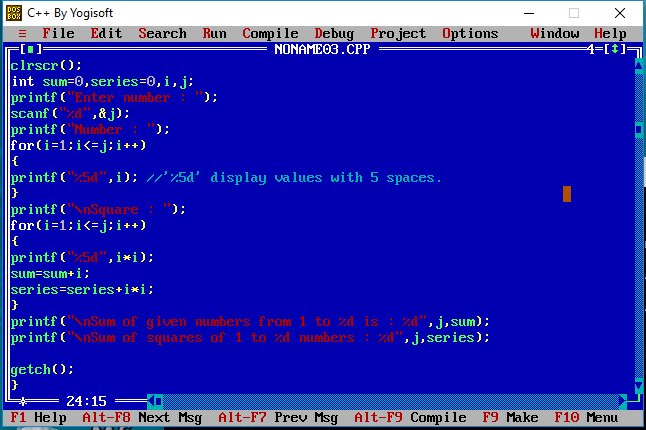
A program to find the sum of the given series.


how to create loop in c

how to initialize loop

for loop example


A program to display the stars using for loop


display star pattern in c

c language example


A program to display the series of numbers using for loop


how to code nested for loop in c


Thursday, 18 July 2019

Switch Statement in C

Switch Statement in C


Switch Statement in C


Switch Statement Program in C


Hello Friends,

Today we will learn Switch Statement.
 Switch Statement is used to make a choice from a number of options.It requires only one argument of any datatype which is checked with the number of case options.If the value matches with case constant then the particular case statement is executed otherwise default  statement is executed.Every case statement is terminated with ':' . The break statement is used to exit from current case statement.

In switch statement,the variable or expression must be a character ('a','b') or an integer(1,2,3).

switch expression should not be terminated with a semicolon(;) or any other symbol.

switch statement can also be written without default statement but break statement is mandatory with all cases.If no break statements are given all the cases would be executed.
The case keyword must contain constant value (i.e integer or character) with a colon(:).

lets take a simple example 

A program to perform addition,subtraction,multiplication and division with switch statement.

Practical Example of Switch

Example of Switch code

output:

How to select option using switch


lets take some more examples of switch statement.


A program to use nested if else statement in the switch statement to display ASCII character.

ASCII using Switch Statement

Demo of Switch

Example of Selection Statement


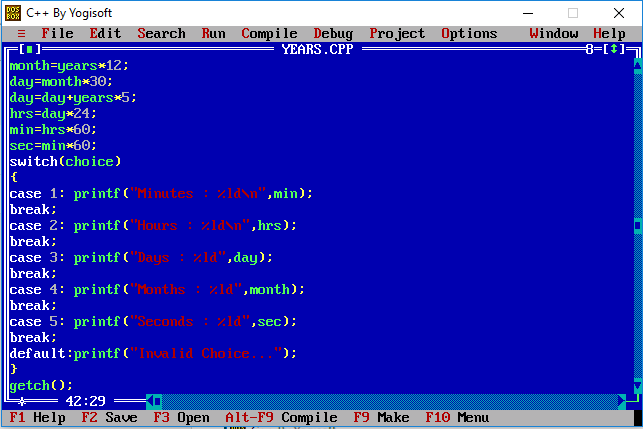
A program to convert years into minutes,hours,days,months or seconds using switch statement.
Example of selection statement to display time


Points to remember
* No two  case statements have identical constant in the same switch.
* In switch statement nested if can be used.
* In switch statement float values or float variable can not be used.
* Only constant values are used with Switch statement.Logical and Relational Operators             cannot be used .


Recent Post

Python Project | Banking System | Project on Banking System using python

  PYTHON PROJECT Banking System import csv import pandas as pd import matplotlib.pyplot as plt import sys import datetime found=False def ne...