Showing posts with label Python. Show all posts

Saturday, 3 October 2020

Series| How to Create Series | Creating Series

Series| How to Create Series | Creating Series


Series is an important data structure(A data structure is a particular way of storing and organizing data in a computer.) of Pandas. It represents a one-dimensional array of indexed data. It is homogenous data structure.

Points to Remember

  • Series is a one-dimensional array.
  • It is Homogenous. It means all the elements must be of same data type.
  • In series, Values are mutable and Size is immutable. It means the elements of the series can be changed but size of a Series once created, cannot change. If you want to add or drop any element, a new series object will be created internally.

 A Series type object can be created in many ways using pandas library Series() method make sure that you have imported Pandas and numpy module with import statements.
  • Create empty Series object by using just the Series() method with no parameter/attribute:

 Syntax:

  SeriesObject=pandas.Series()

 For example:

  import pandas as pd

  S1=pd.Series()

  print(S1)

To create an empty Series having no values you can just use the Series as the above statement will create an empty series type object with no value having the default type which is float64.


  • Create empty Series object by using just the Series() method with parameter/attribute:


 Syntax:

  SeriesObject=pandas.Series(data , index)

 For example:

  import pandas as pd

  S1=pd.Series(data=[2,3,4])

  print(S1) 


To create known empty series objects you need to specify arguments for data and indexes as per following above syntax.


Where data is compulsory and index is optional.


If you do not specify index then by default index array consists of integers 0 through the length of data.


The data is a data part of the series object. It can be one of the following:-

 1. A Python sequence like List, Tuple , range() etc.

 2. An ndarray

 3. A Python dictionary

 4. A Scalar value

 We can create series type object is to give a sequence of values as an attribute to Series(). It will  return an object of series type.

 For instance, consider the following example statements that create   series type objects using some Python sequences


 You can give data as following ways:-  


1. Specify data as Python Sequence :-


 Series with List:

 For example:

1.  import pandas as pd

   L=[2,3,4,5]

   S1=pd.Series(data=L)

   print(S1) 


2. import pandas as pd

    L=[2,3,4,5]

    S1=pd.Series(L)

    print(S1)


3. # Creating Series using data attribute with list

    # We can use multiple list to create a series 

     import pandas as pd

     L1=[2,3,4]

     L2=[4,5,6]

     S1=pd.Series(data=[L1,L2])

     print(S1) 


Screenshot:

Creating Series Using List


 Series with range() function:

4. import pandas as pd

    S1=pd.Series(range(6))

   print(S1) 


5. import pandas as pd

    S1=pd.Series(range(3,20))

    print(S1)


6. import pandas as pd

    S1=pd.Series(data=range(3,20,2))

     print(S1) 


Screenshot:


Creating Series using range() method


2. Specify data as Python ndarray :-


You can create a Series using ndarray from any function such as arange(), linspace(),tile() etc.

 For example:

1.  import pandas as pd

     import numpy as np

     arr1=np.arange(3,13,3)

     S1=pd.Series(arr1)

     print(S1) 


2.  import pandas as pd

     import numpy as np

     S1=pd.Series(np.arange(3,13,3))

     print(S1) 


Screenshot:

Series using arange() method


3. Specify data as Python Dictionary :-

If you are creating a Series from a dictionary then Keys of the dictionary become index of the series and the values of dictionary become data  of Series.


 For example:

1.  import pandas as pd

     S1=pd.Series({'Name':'Asha','Age':34})

     print(S1) 


2.  import pandas as pd

     dict={'EmpName' : 'Harsh' , 'Salary' : 40000, 'Empid' : 001}

     S1=pd.Series(dict)

     print(S1) 


Screenshot:

Creating Series using Dictionary


4. Specify data as Python Scalar Value :-

If you are creating a Series using scalar value or single value, the index should be displayed according to the value length. 

 For example:

1.  import pandas as pd

     S1=pd.Series(data=20)

     print(S1) 


2.  import pandas as pd

     val=20

     S1=pd.Series(val)

     print(S1) 

Creating Series using Scalar Value


Monday, 13 July 2020

Data Visualization in Python | Graphs in Python | Python Graph

Data Visualization in Python | Graphs in Python | Python Graph


Data Visualization  in Python basically refers to the graphical or visual representation of information and data using charts or graphs.

We can create many graphs or charts using python such as line chart,bar chart, pie chart etc..

In data visualization, we have to use Matplotlib Library's Pyplot.
Pyplot is a collection of methods within matplotlib library which allows user to construct 2D plots or charts easily and interactively. 

Note: The matplotlib is a python library that provides many interfaces and functionality for 2 D- graphics. This library offers many different named collections of method. Pyplot is one such interface.

Pyplot is a collection of methods within matplotlib which allows user to construct 2D plots easily and interactively. Pyplot essentially reproduces plotting functions.The Pyplot interface provides many methods for 2D plotting of data.

The matplotlib's Pyplot interface lets one plot data in multiple ways such as line chart, bar chart, pie chart, scatter chart etc. 

 As we know that Graphs and Charts are very effective tools for data visualization. So we can create many different types of graphs and charts using PyPlot. Also,we can easily plot the data available in the form of NumPy arrays or dataframes etc.

Types of Charts | Graphs | Plots

  • Line Chart
  • Bar Chart
  • Pie Chart
  • Histogram Chart
  • Scatter Chart
  • BoxPlot Chart

Line Chart

A line chart or line graph is a type of chart which displays information as a series of data points called 'markers' connected by straight line segments. With PyPlot, a line chart is created using plot() function. Data points are called 'markers'

plot() function in line chart

Note plot() function is used to create a line chart with single  statement or multiple statements. show() function is used to display the graph on the screen.plot() function takes list or array as an argument to draw a line chart.

Syntax of line graph

import matplotlib.pyplot as plt

plt.plot(<data1>,<data2>,<arguments(Optional)>)


for example 

We have single statement 

import matplotlib.pyplot as plt
or
from matplotlib import pyplot as plt

rollno=[1,2,3,4]
marks=[10,15,20,25]
plt.plot(rollno,marks)
plt.show()


line graph in python


Arguments in line chart


We can format our line graph using some arguments such as linestyle or ls , linewidth, marker, markersize, markeredgecolor, color , label etc.

linestyle : linestyle or ls  argument is used to give the style of line. There are four line styles such as solid, dashed, dotted and dashdot.
By default line displays in solid form.

plt.plot(x,y,linestyle='solid')


linewidth : linewidth argument is used to give the width of line.
It takes integer value such as 2,3,1,4 etc.

plt.plot(x,y,linewidth=4,ls='dashed')

marker : marker argument is used to give a symbol or a valid marker style such as '-', 'o', 'x', '+', 'd' etc.

plt.plot(x,y,marker='d')

markersize : markersize argument is used to give the size of marker in values.

plt.plot(x,y,markersize=5,marker='+')

markeredgecolor: markeredgecolor argument is used to give a valid color for markers. If you donot specify markeredgecolor argument separately, it takes the same color as the line.

plt.plot(x,y,markeredgecolor='red')

label: label argument is used to display the label for line.But to show the label inside the graph, you will have to use legend() method. The legend() method  helps to show label inside graph. If you do not use legend() method then label will not be displayed.

plt.plot(x,y,label="Amit's Marks")
plt.legend()

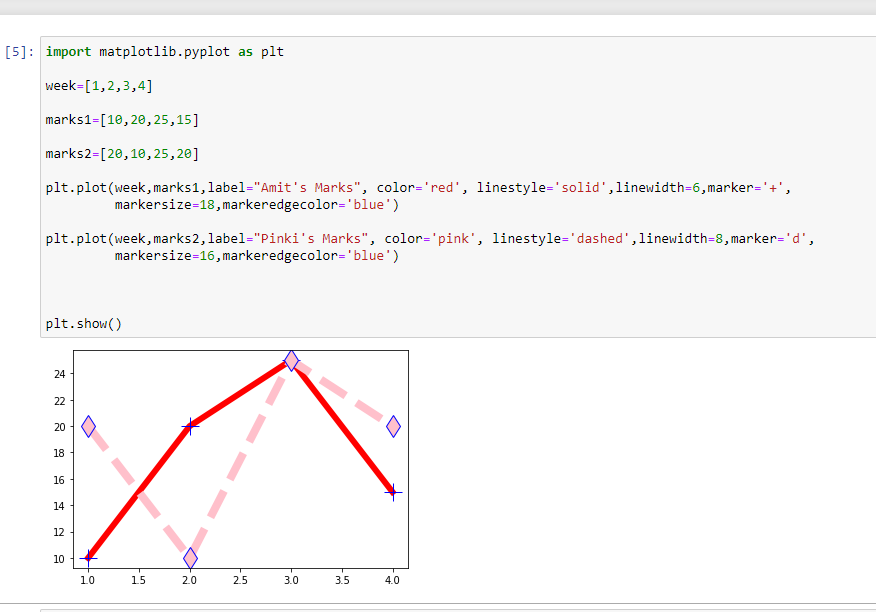
Example of Line Graph 


import matplotlib.pyplot as plt
week=[1,2,3,4]
marks1=[10,20,25,15]
marks2=[20,10,25,20]
plt.plot(week,marks1,label="Amit's Marks", color='red', linestyle='solid',linewidth=6,marker='+',markersize=4,markeredgecolor='blue')
plt.plot(week,marks2,label="Pinki's Marks", color='pink', linestyle='dashed',linewidth=8,marker='d',markersize=6,markeredgecolor='blue')

plt.show()


python line graph

Methods Used in Line Chart

xlabel() method
ylabel() method
title() method
grid() method
legend() method

We can use xlabel() method and ylabel() method to display text for x-axis and y-axis.And title() method to give the title to the graph.The legend() method  helps to show label argument (that is given with plot() method ) inside graph.

plt.xlabel("Weeks")
plt.ylabel("Marks")

plt.title("Report Card")


you can give any text to xlabel and ylabel.


line graph arugments in python


line graph method


Wednesday, 3 June 2020

Python Strings | Strings in Python

Python Strings | Strings in Python


Python Strings are characters enclosed in single quotes, double quotes or triple quotes.
Strings are sequence of characters where each character has a unique position or index no.
Strings are immutable(you can not change any character of given string).

what is python strings.
Python Strings


How to create strings in python ?


string1="Welcome"

or

string1=input("Enter a string")


strings with python


String Indexing


The individual character of a string are accessible through the unique index of each character.


strings in python


Note The given string 'WELCOME' has its own unique index number. The indexes of a string begin from 0 to length-1 in forward direction and -1,-2,-3,... length in backward direction.
So if you want to retrieve any character fro the strings you can retrieve using index number.


string indexing in python


String Slicing

In Python, String slice refers to a part of the string where strings are sliced using a range of indices.

For example : 

we have a string named as S1= 'Welcome' , if we give S1[x:y] where x and y are integers indices. Python will return a slice of the string by returning the characters falling between indices x and y.


slicing in python

how to do string slice

String Operators

There are two basic operators :

  •  Concatenation ( + ) and Replication ( * )


There are two membership operators:

  •     in
  •     not in


replication in python

When we used with strings + operator performs concatenation rather than addition and  * operator performs replication  rather than multiplication.

Concatenation Operator


For example :

we take two strings 

string1= "Hello"
string2="Python"
print(string1+string2)

Note when we use print function to display the concatenated string , it display temporary because print function is used to display text on the screen. And, Strings are immutable so we can not change it.
So if you want to change the string , you have to create a new string.

Such as

string1= "Hello"
string2="Python"
string3=string1+string2
print(string3)

Another important thing that you need to know about + operator is that this operator can work with numbers and strings separately for addition and concatenation respectively, but in the same expression, you cannot combine numbers and strings as operands with a + operator.

for example:

23 + 44=67   # addition is valid because both operands are integers.

'23' + '44'=2344  #concatenation is valid, both operands are strings. 

But the expression

'23' + 4  # It is invalid. It will raise an error.

Note The + operator has to have both operands of the same type. Integer type is for addition and String type is for concatenation. It cannot work with one operand as string and one as a number.

 Replication Operator

The * operator when used with numbers i.e. when both operands are numbers, it performs multiplication and returns the product of the two number operands. 

To use a * operator with strings, you need two types of operands one string and another number i.e. number * string or string * number.

Where string operand tells the string to be replicated and number operand tells the number of times, it is to be repeated. 

Python will create a new string that is a number of repetitions of the string operand.

for example:

"python" * 2  # it will display 'python 3 times' 

python python python

Another important thing that you need to know about * operator is that this operator can work with numbers as both operands for multiplication and with a string and a number for replication respectively, but in the same expression, you cannot have strings as both the operands with a * operator.

for example:

2*3 = 6 #multiplication is valid because both operands are integers.

"2" * 3="222" # replication is valid one operand is string and other                             integer.

but the expression 

"2" * "3" # it is invalid. It will raises an error  .

Note The * operator has to either have both operands of the integer type for multiplication or one operand string type and one integer type for replication. It cannot work with the both operands of string types.

Membership Operators

There are two membership operators for strings. These are in and not in . 

When we use membership operators with strings , it require that both operands used with them are of string type.

in : It returns True if a character or substring exists in the given string; false otherwise.

not in : It returns True if a character or a substring does not exist in the given string; false otherwise.

Both membership operators can work with strings variables.

not in operator
python membership operators


String Methods

python string function

capitalize() method: It capitalize first character of the string.
replace() method: It replace the occurrence of old element to new.
upper() method: It converts lowercase characters into uppercase.
lower() method: It converts uppercase characters in to lowercase.
index() method: It returns index number.
find() method: It returns index number of the given character.
count() method: It counts total number of elements  in a string.


Note Here we have used string method with print function for temporary displaying the output. It does not mean that we have made changes to a string. we cannot make changes on strings as we know that strings are immutable. So if you want to make changes to a string , you have to take another string type variable.

for example:

we have a string 

str1="Programming with aarti" 

str2=str1.capitalize()

print(str2)

str2=str1.find('m')

print(str2)

str2=str1.replace('a','A')  and so on....


Python Numpy

Wednesday, 27 May 2020

Python Numpy | Numpy in Python

Python Numpy | Numpy in Python | Arrays in Python


How to create Numpy arrays  using array() method, fromiter() method, arange() method.


NumPy Arrays

  • It is also known as N-Dimensional Array(ndarray).
  • It can be of two types
            One-Dimensional Array(are also known as vectors)
            Multi-Dimensional Array(are also known as matrices)

  • •It is Linear Algebra Library in Python. ‘import numpy’.
  • •It describes the element in array of the same datatype.
  • •It is used for performing mathematical and logical operations    on arrays.


numpy array

how to define array in numpy


How to create arrays?


python functions


python functions in numpy

There are many ways to create numpy arrays . Lets discuss 


array() method

The array() is useful for creating ndarrays from existing lists and tuples.

Syntax:

variable_name=numpy.array(<arrayConvertibleObject>,dtype)

numpy has been imported as np
dtype is optional


1. Creating numpy array using array() method with list.

             first we import a library for creating arrays.

Creating One Dimensional array using array method with the help of list:

import numpy as np      
list1=[2,3,4]                      
array1=np.array(list1)
print(array1)

Creating Two Dimensional array using array method with the help of 2 lists:

import numpy as np
list1=[2,3,4]
list2=[4,3,2]
array2=np.array([list1,list2])  
# whenever you use multiple list to create array we write as 
# variable_name=numpy_alias_name.array([,])
print(array2)


two dimensional array using two list


Here, We have write  'import numpy as np ' numpy is a python library which is used to create array. np means alias name of numpy. It is creating for using numpy method so we create an alias name through which we can invoke numpy methods with a dot operator. 
We can create array using list, tuples and directly with the help of array method. Dictionary and Strings are not good for creating array with array method. 

If you try to create array using dictionary and strings, you can do successfully. 
But you cannot access individual elements of the array using indexes.It generates error.

See example:

dictionary array


2.  Creating numpy array using array() method with tuple.


Creating One Dimensional array using array method with the help of tuple:

import numpy as np      
tup1=(4,5,6)
array1=np.array(tup1)
print(array1)

Creating Two Dimensional array using array method with the help of 2 tuples:

import numpy as np
tup1=(4,5,6)
tup2=(6,5,4)
array2=np.array([tup1,tup2])  
print(array2)


creating array using tuple


3.  Creating numpy array using array() method directly.


Creating One Dimensional array using array method :

import numpy as np      

array1=np.array([2,5,7])
print(array1)

Creating Two Dimensional array using array method : 

import numpy as np

array2=np.array([[2,4,6],[6,7,8]])  
print(array2)

python numpy array method


The reason for this is that array() created object array or special unicode type arrays and accessing these arrays with indexes generates error.

The solution of the above problem is fromiter() method.


fromiter() method

We can create array or ndarray from all sequences such as list,tuple,strings,dictionaries etc. using fromiter() method.It supports all numeric and non-numeric sequences.

The fromiter() function is useful , when you want to create an ndarray from a non-numeric sequence.

 However, fromiter() is good for creating array using dictionaries and strings.

When we create ndarray from a dictionary using fromiter().
It takes only keys of the dictionary.Please remember that with fromiter() , the dtype argument must be given.

Syntax:

numpy.fromiter(<iterable sequence>,dtype=<datatype>,[count=<number of elements to be read>])


import numpy as np

# creating ndarray from dictionary with string keys

dic={'name':'amit','salary':100000,'age':45}
array1=np.fromiter(dic,'U1')
print(array1)

# creating ndarray from dictionary with integer

dic1={1:2,3:4,4:6,7:0}
array2=np.fromiter(dic1,dtype=np.int32)
print(array2)

# creating ndarray from string

str="ILovePython"
array3=np.fromiter(str,'U1')
print(array3)


numpy fromiter method


Here, We create an ndarray from dictionary with string type keys. As we know fromiter function only takes keys as array elements.

We also create an ndarray from dictionary with integer type keys. And created ndarray from individual letters of a string using fromiter() function.


We can also create from list and tuples.The method would be same i.e. the iterable name and dtype as the required arguments.

The function fromiter() also supports one more argument called count using which we can put a limit on how many elements from the iterable are to be picked for the ndarray.

For example :

we have a string of 20 letters including blank spaces and you want to create a ndarray of first 10 letters so you can give additional argument count=10. It will take only 10 letters as elements.


syntax of fromiter method

 You can use count argument with dictionary also.


arange() method

The arange() method is similar to Python's range() function. Python's range() method returns a list but arange() method returns ndarray.The arange() function creates a numpy array with evenly spaced values within a specified numerical range.

Syntax:

<arrayname>=numpy.arange([start],[stop],[step],[dtype])

  • Here, The start, stop and step attribute provide the values for starting value, stopping value and step value for a numerical range. Start and Step values are optional. When only stop value given, the numerical range is generated from 0 to stop value with step 1.
  • The dtype specifies the datatype for the numpy array.
  • If you given start and stop value it generates the numerical range of values from start value to stop value with step 1.
  • If you give start,stop and step value, it generates the range from start value to stop with the given step value. 


1.  Creating numpy array using arange() method.


Creating One Dimensional array using arange method :

import numpy as np
# creating ndarray with stop attribute
array1=np.arange(5)
print(array1)
# creating ndarray with start and stop attribute
array2=np.arange(2,10)
print(array2)
# creating ndarray with start,stop and step attribute
array2=np.arange(2,10,2)
print(array2)
# creating ndarray with start,stop,step and count attribute
array2=np.arange(2,10,2,dtype=np.float32)
print(array2)


arange function in python

Remember that we cannot create multi dimensional array or 2 Dimensional array with arange() function directly. For creating 2 dimensional array we have to use reshape() method.


Creating 2 Dimensional array using arange method :

first we have to create 1 D array  as :


import numpy as np

# creating ndarray with start attribute
array1=np.arange(10)
print(array1)

# creating 2 D array
ar1=array1.reshape(5,2)
print(ar1)

# creating ndarray with start and stop attribute
array2=np.arange(1,11)
print(array2)

# creating 2 D array
ar2=array2.reshape(2,5)
print(ar2)

# creating ndarray with start,stop and step attribute
array3=np.arange(2,10,2)
print(array3)

# creating 2 D array
ar3=array3.reshape(2,2)
print(ar3)

# creating ndarray with start,stop,step and count attribute
array4=np.arange(2,10,2,dtype=np.float32)
print(array4)

# creating 2 D array
ar4=array4.reshape(2,2)
print(ar4)


arange function uses reshape method


reshape method in python numpy


Here remember one thing is that the shape of originally created ndarray using arange() method must be compatible with the new shape that you specify with reshape() function. If you created an ndarray containing 9 elements with arange() method, you can easily reshape it into a 2D  ndarray of 3 X 3 size but you cannot reshape it to 4 x 2  or 5 x 2 shapes as these are not compatible with the original shape.

In other words , the number of elements created ndarray must be the same as that of new 2D ndarray being created through reshape() method.

You can also combine both arange() and reshape() methods in a single statement as :

arr2= np.arange(10).reshape(2,4)

And,

You can also create floating values as elemnets

arr2=np.arange(9.0).reshape(3,3)
print(arr2)

It will give result as

array([[0. 1. 2.],
           [3. 4. 5.],
           [6. 7. 8.]])


Python Strings

Recent Post

Python Project | Banking System | Project on Banking System using python

  PYTHON PROJECT Banking System import csv import pandas as pd import matplotlib.pyplot as plt import sys import datetime found=False def ne...